Want to create original songs, vocal covers, or music videos for a faceless YouTube channel without recording your own singing voice? AI singing voice generators can help you explore vocal styles, create musical ideas, and develop a more efficient content-production workflow.
But choosing the right tool takes more than finding a free plan. Some platforms generate complete songs from text prompts, while others convert existing vocals or synthesize singing from lyrics and musical notes. Their export options, commercial-use permissions, and editing capabilities can also differ significantly.
In this guide, we compare five AI singing and music tools: Kits AI, Suno, ACE Studio, Synthesizer V Studio, and Udio. We explain what each tool is designed for, what its free or trial access offers, and what you should check before publishing music on YouTube.
Quick answer: Suno is worth considering for generating complete songs from prompts. Kits AI is designed for AI vocal conversion, while ACE Studio and Synthesizer V are more suitable for specialized vocal-production workflows. Udio requires particular caution if your goal is to download newly generated tracks and publish them elsewhere.
One important distinction: a free trial does not automatically grant commercial-use rights, and a paid subscription does not guarantee that every generated song is free from copyright disputes.
How We Evaluated These AI Singing Tools
This comparison focuses on five practical considerations:
- Primary use: Whether the tool generates complete songs, converts voices, or synthesizes vocals.
- Free access: What users can try without paying, including download restrictions.
- Production control: Whether creators can refine vocals, lyrics, notes, or arrangements.
- Commercial permissions: What the provider’s published terms say about commercial use.
- Faceless-channel suitability: Whether the tool fits a workflow for creating original music videos.
Pricing and feature information was checked against available official product pages and documentation. Community discussions on Reddit were also reviewed to understand the challenges individual creators report.
This is a research-based comparison, not a claim that every tool was personally tested in a controlled audio-quality test. We have therefore avoided inventing performance scores or presenting unverified experiences as our own.
5 Best AI Singing Voice Generators for Faceless YouTube Channels
1. Kits AI — Best for AI Vocal Conversion
Kits AI is a useful option for creators who want to experiment with converting existing vocals or processing individual vocal elements. Its tools include voice conversion, generative vocals, and other audio-processing features.
Unlike a tool designed primarily to generate a complete song from a text prompt, Kits AI is especially relevant when you already have a vocal recording or want to work with vocals as part of a larger music-production process.
Key features
- AI voice conversion
- Generative vocal tools
- Vocal processing and audio utilities
- Voice design and blending features
💡 Pro Tip: Before choosing an AI singing voice generator, think about your entire content workflow—not just vocal quality. The best tool should fit your budget, provide the export options you need, and clearly explain its commercial-use permissions. If you’re also exploring AI tools for writing scripts, creating visuals, and producing videos, check out our guide to Best AI Tools for Content Creators in 2026 to discover tools that can help streamline your faceless YouTube workflow.
Pricing and free-plan limits
Kits AI’s official pricing page lists these plans:
| Plan | Published price | Download allowance |
| Free | $0/month | 0 download minutes |
| Starter | $10/month | 15 download minutes/month |
| Producer | $30/month | 60 download minutes/month |
| Professional | $60/month | Unlimited download minutes, subject to fair use |
These are the prices displayed for new users on the official pricing page when checked. Confirm the current checkout price and billing terms before subscribing.
The free plan includes 15 conversion minutes, but zero download minutes means you should not assume it provides downloadable finished audio.
Best for: Creators exploring AI vocal conversion and vocal-processing workflows.
Limitations: Download allowances differ by plan, and voice permissions matter if you are working with recognizable artists or custom voice models.
Official source: https://www.kits.ai/pricing
2. Suno — Best for Generating Complete Songs
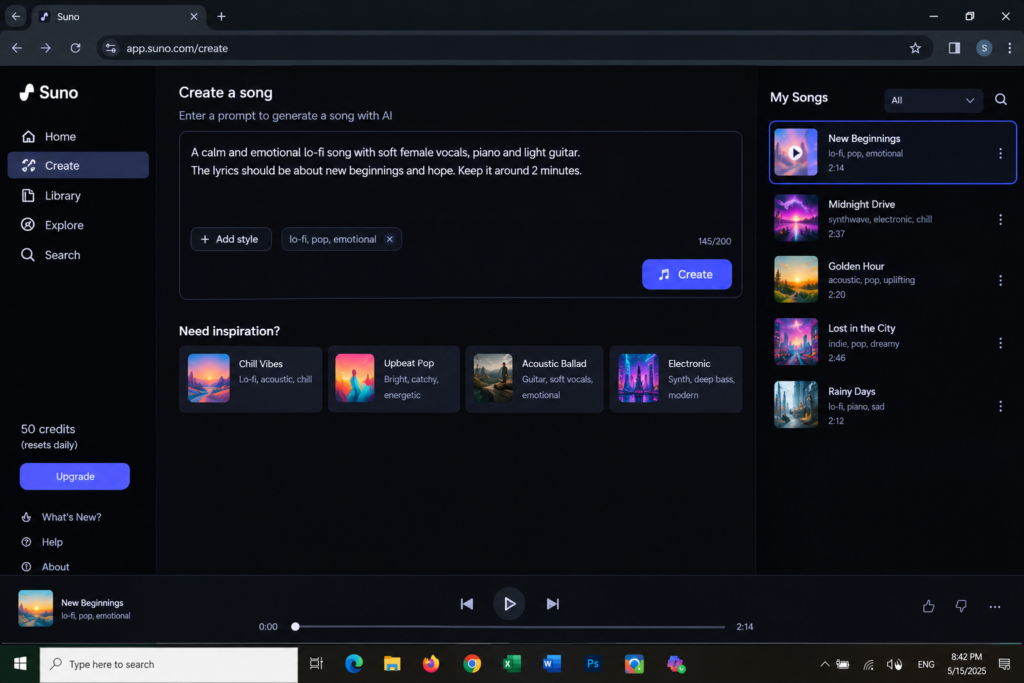
Suno is a practical starting point for creators who want to turn a written musical idea into a complete song. You can describe a genre, mood, arrangement, and vocal style, then use the generated output as a starting point for your project.
For example, you could describe an original electronic pop song with an energetic chorus, warm vocals, and a futuristic instrumental arrangement.
Key features
- Prompt-based song generation
- Vocal and instrumental creation
- Different musical styles and moods
- Tools for developing musical ideas
Free-plan limits and commercial use
Suno’s official help page lists 50 credits that renew daily on the free plan. Its terms state that free-tier outputs are for personal, non-commercial use. You should not use free-plan songs in monetized videos unless the applicable terms explicitly permit that use.
Suno’s paid plans provide different usage permissions, but the applicable terms still matter. Its terms also distinguish permitted downloads and commercial-use rights, and do not guarantee that copyright will vest in every generated output.
Best for: Beginners who want to explore complete songs without building every vocal and instrumental element separately.
Limitations: You must understand the difference between generating a song, being allowed to download it, and having permission to use it commercially.
Official sources:
- Pricing: https://suno.com/pricing
- Free-plan rights: https://help.suno.com/en/articles/9601601
- Terms of service: https://suno.com/terms-of-service
3. ACE Studio — Best for Detailed Vocal Production
ACE Studio is designed for music creators who want greater control over AI-assisted vocal production. Its features include vocal synthesis, voice conversion, AI voices, and music-production tools.
It is worth considering if you want to work with lyrics and musical notes or refine vocal performances rather than relying entirely on a single text prompt.
Key features
- AI vocal synthesis
- Voice conversion
- AI voice and instrument options
- Music-production tools
- Additional generative features
Pricing
ACE Studio’s official pricing page lists the Artist plan at $20.73 per month when billed yearly, discounted from $25.73, and Artist Pro at $27.50 per month when billed yearly, discounted from $34.38. Promotional prices and plan details can change, so check the current official page before purchasing.
Commercial-use permissions
ACE Studio states that its outputs can generally be used in commercial and non-commercial projects, subject to exceptions for particular voices, features, instruments, and third-party services.
Its documentation also explains that users are responsible for having the necessary rights to uploaded lyrics, reference audio, stems, and other source materials. Some voices require a separate third-party licence.
Best for: Creators who want more control over AI vocal production and are comfortable learning a specialized music tool.
Limitations: Some features require a paid plan, and not every voice has identical licensing conditions.
Official sources:
- Pricing: https://acestudio.ai/pricing/
- Licensing: https://docs.acestudio.ai/appendix/license-and-copyright
4. Synthesizer V Studio — Best for Note-by-Note Vocal Control
Synthesizer V Studio is a specialized vocal-synthesis tool for creators who want to work more directly with musical notes, lyrics, timing, and vocal expression.
Rather than relying entirely on a text prompt, this approach lets you build and refine a synthesized singing performance within a music-production workflow.
Key features
- Vocal synthesis from lyrics and musical notes
- Detailed control over a vocal performance
- A workflow suited to original compositions
- Voice databases with their own usage terms
Pricing and trial access
Synthesizer V offers different editions and voice databases. Exact prices depend on the product and voice you choose, so check the official store rather than relying on a single price quoted by a third-party comparison website.
The official manual states that the editor and voices can be tried for free, but audio created during the trial cannot be used commercially. Individual voice licences may also impose specific conditions.
Best for: Musicians, composers, and creators who want detailed control over synthesized singing.
Limitations: The workflow can take more time to learn than prompt-based music generation. Trial output is not a substitute for a commercial licence.
Official documentation: https://sv2.docs.dreamtonics.com/en/limitation
5. Udio — Best for Exploring AI Music Ideas, With Important Export Restrictions
Udio is an AI music-generation platform that has been used to explore musical ideas and generate songs from prompts. However, its current publishing workflow needs special attention.
Following music-industry agreements announced in 2025, Udio disabled downloads during its transition to a new model. Its team explained the restriction in an official community update, and the changes generated significant discussion among users.
That history matters for creators who specifically need downloadable tracks for YouTube, distribution services, or external editing software.
Key considerations
- AI-assisted music generation
- A platform for experimenting with musical ideas
- Download and export availability must be checked before committing to a workflow
- Current terms must be reviewed before relying on it for commercial publishing
Best for: Creators who want to explore AI music concepts and are comfortable checking the platform’s current capabilities before starting a project.
Limitations: Do not assume that a generated track can be downloaded or uploaded to YouTube. Verify current export functionality and applicable permissions directly with Udio.
Official community update: https://www.reddit.com/r/udiomusic/comments/1okj79g/important_update_from_team_udio/
For a faceless YouTube channel that depends on downloading newly generated tracks, consider a tool with a clearly documented export workflow instead.
AI Singing Voice Generators Compared
| Tool | Best use | Free access | Main consideration |
| Kits AI | Vocal conversion | Yes; 15 conversion minutes, 0 download minutes | Export limits |
| Suno | Complete song generation | Yes; 50 daily credits listed | Free outputs are non-commercial |
| ACE Studio | Detailed vocal production | Check current offers | Plan and voice-specific licences |
| Synthesizer V Studio | Note-by-note vocal synthesis | Trial access | Trial output cannot be used commercially |
| Udio | Exploring music ideas | Check current availability | Download and export restrictions |
Pricing, credits, features, and licensing terms can change. Check the official sources linked in each section before purchasing or publishing.
What Real Creators Say About AI Music on Reddit
Reddit discussions provide useful context about the practical challenges of building an AI music channel. These are individual accounts, not independently verified experiments, and their results should not be treated as typical outcomes.
1. Choosing a clear music niche matters
In a November 2025 discussion on r/SunoAI, a creator described lessons from posting AI music on YouTube, including differences in competition between music genres and the importance of understanding the audience for a particular niche.
The practical takeaway is to choose a recognizable direction—such as relaxing instrumentals, a specific musical genre, or original vocal songs—instead of uploading unrelated tracks without a clear channel identity.
Source: https://www.reddit.com/r/SunoAI/comments/1opjxry/some_things_i_learned_posting_ai_music_on_youtube/
2. Publishing more songs does not guarantee audience growth
A July 2026 discussion in r/SunoAI described a creator who had been working on a YouTube music channel for months but was still struggling to attract subscribers and reach the right listeners.
This highlights a common challenge: generating music is only one part of running a channel. Discoverability, audience targeting, presentation, and promotion also influence whether people find and return to your content.
Source: https://www.reddit.com/r/SunoAI/comments/1vbp1kn/six_months_of_taking_youtube_seriously_but_almost/
3. Monetization and copyright claims require separate attention
In a February 2026 r/SunoAI discussion, a creator reported receiving a copyright claim on an AI-generated instrumental track and asked how to handle the dispute.
This is an individual report, not proof that every AI-generated song will receive a claim. It nevertheless illustrates why creators should retain relevant subscription records, licence information, and source-material permissions.
Source: https://www.reddit.com/r/SunoAI/comments/1rc5r4r/sunoai_youtube_copyright_violation/
What these discussions mean for beginners: Pick a clear niche, make each video meaningfully original, and verify the rights to your music before publishing. Do not assume that a successful channel reported by one Reddit user guarantees similar results for another creator.
How to Create AI Singing Content for a Faceless YouTube Channel
Step 1: Choose Your Content Format
Decide what you want to create before selecting a tool.
Examples include:
- Original songs with generated vocals
- Animated lyric videos
- Music-production tutorials
- Original musical shorts
- Educational videos about AI music
If you want a complete song, start by exploring a song-generation platform. If you already have music or need greater control over individual vocals, consider a vocal-conversion or vocal-synthesis tool.
Step 2: Create Original Lyrics and a Clear Prompt
Describe the genre, mood, tempo, instrumentation, and vocal characteristics you want.
For example:
“Create an original upbeat electronic pop song with an energetic chorus, warm synthesized vocals, a clean instrumental arrangement, and a positive futuristic atmosphere. Use original lyrics and do not imitate a specific artist.”
A clear prompt gives the generator creative direction without requesting an unauthorized imitation of a real singer.
Step 3: Review the Generated Audio
Listen to the entire track before using it in a video.
Check whether:
- The lyrics are understandable.
- The vocal timing sounds natural.
- The instrumental mix is balanced.
- The audio contains unwanted artifacts.
- The final result fits the intended audience.
Revise the prompt or use the available editing tools if the result needs improvement.
Step 4: Confirm Download and Commercial-Use Rights
Before publishing, verify:
- Whether your subscription permits commercial use.
- Whether the specific track qualifies for those rights.
- Whether the voice model and source material are properly licensed.
- Whether attribution or other restrictions apply.
- Whether you can download the finished audio through an authorized method.
Keep relevant subscription receipts, licence documents, and project records.
Changing a song’s pitch or speed does not grant permission to use copyrighted material.
Step 5: Create an Original Video
Make the video valuable beyond simply displaying a static image while a song plays.
Depending on your format, you could use original animation, meaningful lyric synchronization, custom visual storytelling, or editing that follows the music.
YouTube monetization depends on the channel and its content meeting the platform’s applicable policies. AI use alone does not automatically guarantee approval or rejection. Review the current YouTube Partner Program requirements before building your publishing strategy around music.
Copyright and YouTube Monetization: What You Need to Know
There are three separate questions to consider.
1. Does the licence permit commercial use?
Check whether the tool’s agreement allows you to use the specific output in monetized videos.
2. Are third-party rights involved?
Copyrighted lyrics, samples, backing tracks, recordings, and unauthorized voice imitations can create legal or platform problems.
3. Does your channel meet YouTube’s monetization rules?
Even when you have permission to use the audio, your overall content must meet the platform’s requirements.
A paid subscription does not guarantee that every output is free of disputes or that a channel will be accepted into the YouTube Partner Program. Likewise, an AI-generated track is not automatically copyright-free simply because a tool created it.
For a long-term music channel, prioritize original material, authorized voice models, clear licences, and meaningful creative input.
Common Mistakes to Avoid
- Choosing a tool based only on its free plan: A free tier may not include downloads or commercial permissions.
- Assuming AI music is automatically copyright-free: The tool’s terms and third-party rights still matter.
- Cloning a recognizable singer without permission: Use authorized voices or your own voice.
- Publishing unreviewed audio: Check lyrics, mix quality, and the final video before uploading.
- Trying to bypass copyright detection: Changing pitch or speed does not provide permission to use protected music.
- Uploading repetitive, low-value videos: Build each video around a clear creative purpose instead of relying on automated production alone.
Frequently Asked Questions
What is the best free AI singing voice generator for a faceless YouTube channel?
Suno is a useful starting point for experimenting with complete songs from text prompts. Its free plan, however, is for personal, non-commercial use. Kits AI offers free conversion access, but its listed free plan has zero download minutes.
Can I monetize AI-generated singing on YouTube?
Potentially, yes. You need the necessary rights to the audio and must comply with YouTube’s monetization policies. A paid AI subscription alone does not guarantee monetization approval.
Is AI-generated music copyright-free?
Not automatically. Usage permissions depend on the tool’s terms, source material, and applicable law. Copyright protection for AI-generated material can also depend on the jurisdiction and the amount of human authorship involved.
Can I use an AI version of a famous singer’s voice?
Do not assume that you can use a cloned or imitated voice commercially just because a tool lets you generate it. Verify the necessary permissions and applicable rights before publishing.
Do I need to show my face to run a YouTube music channel?
No. You can use original animation, lyric videos, custom visuals, and other faceless formats. Your priority should be original, valuable content that complies with YouTube’s policies.
Which AI singing tool is best for beginners?
For complete songs from text prompts, Suno is a reasonable starting point. For AI vocal conversion, explore Kits AI. For more detailed vocal production, consider ACE Studio or Synthesizer V Studio. Choose based on your workflow and the licence you need.
Final Verdict
The best AI singing voice generator depends on the type of faceless YouTube channel you want to build.
- Suno: A useful starting point for complete songs generated from text prompts.
- Kits AI: Worth exploring for AI vocal conversion and vocal-processing workflows.
- ACE Studio: A strong option to investigate for detailed vocal production.
- Synthesizer V Studio: Suitable for creators who want note-by-note vocal synthesis.
- Udio: Explore cautiously if your workflow depends on downloading and publishing generated tracks elsewhere.
Before publishing, verify the current pricing, download allowances, voice permissions, and commercial-use terms for your chosen tool.
The strongest long-term strategy is not simply generating more music. It is creating distinctive content that combines AI assistance with thoughtful editing, original creative decisions, and responsible use of licensed material.

Welcome to CreatorAIKits! I’m passionate about learning and exploring AI tools, creativity, and technology.
I’m continuously researching and gaining hands-on experience with different AI tools and technologies.
My goal is to share simple, useful, and practical AI information for beginners and everyday users.
Thanks for visiting CreatorAIKits!