
Artificial intelligence is no longer evolving in yearly product cycles. New AI-powered products are appearing every week, and the most interesting launches are increasingly focused on solving very specific problems rather than trying to become another general-purpose chatbot.
This week is a good example.
On Product Hunt’s September 7, 2026 leaderboard, Scriptly ranked #2, Tucky ranked #3, and Routines by Databox ranked #4. Each product approaches AI from a completely different direction: Scriptly focuses on video creation, Tucky combines notes with an AI agent on macOS, and Routines by Databox brings scheduled AI analysis to business data.
That difference matters.
Instead of asking “Which AI tool is the best?”, the more useful question is:
Which new AI tool solves a problem you actually have?
In this review, we examine these three launches based on their core functionality, platform availability, pricing, practical use cases, strengths, limitations, and overall value. We also separate verified product information from editorial judgment so you can decide whether any of them deserve a place in your workflow.
Quick verdict: Scriptly is the most interesting option for iPhone video creators, Tucky stands out for Mac users who want notes and AI assistance close to their workspace, and Routines by Databox is the strongest choice for businesses that repeatedly analyze performance data.
Quick Comparison: 3 Notable AI Launches
| Tool | Best For | Main Idea | Platform | Pricing |
| Scriptly | Video creators | Voice-controlled teleprompter | iOS | Free public beta |
| Tucky | Mac users & note-takers | Edge-docked notes with AI | macOS | Free; Plus $4/month |
| Routines by Databox | Businesses & marketers | Scheduled AI analysis | Web | Free plan + paid plans |
Pricing and availability can change as these relatively new products develop.
Scriptly: A Voice-Controlled AI Teleprompter for iPhone


If you’ve ever recorded a video while reading from a teleprompter, you already know the problem with traditional scrolling: your voice doesn’t always move at the same speed as the text.
You may pause.
You may repeat a sentence.
You may improvise.
Or you may speak faster than expected.
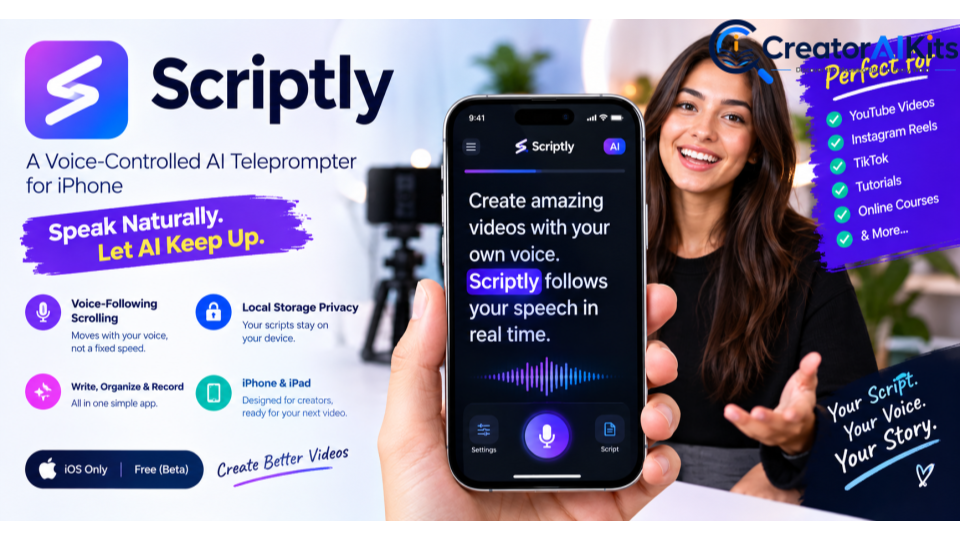
Scriptly approaches the problem differently. Its core feature is a voice-controlled teleprompter designed to follow what you are saying in real time.
Product Hunt describes Scriptly as an iOS teleprompter with real-time voice-following scrolling, local-storage privacy, and professional teleprompter tools. The product is currently available as a public beta through TestFlight.
How Scriptly Works
The basic workflow is straightforward:
- Prepare your script.
- Open Scriptly on your iPhone or iPad.
- Start recording or rehearsing.
- Speak naturally.
- Let the teleprompter follow your delivery.
The interesting part is that the app is designed around voice-following rather than fixed-speed scrolling.
That makes it particularly relevant for creators who want their delivery to look more natural on camera.
Key Scriptly Features
Real-Time Voice Following
This is Scriptly’s defining feature.
Instead of choosing a scrolling speed and trying to keep your speech synchronized with it, the app is designed to move through the script based on your voice.
That can be especially useful for:
- YouTube videos
- Instagram Reels
- TikTok videos
- Tutorials
- Educational content
- Product demonstrations
- Talking-head videos
Local Storage Privacy
Scriptly’s Product Hunt listing highlights local storage privacy as part of the product.
For creators working with unreleased scripts, client material, or confidential ideas, local handling can be an attractive part of the workflow.
Script Organization
Scriptly is not positioned only as a scrolling tool. Its Product Hunt description also highlights writing, organizing, and recording videos within the app.
That makes it more useful as a creator workflow rather than simply a digital replacement for a physical teleprompter.
Scriptly Platform Availability
Currently, Scriptly is focused on iOS, with its public beta distributed through TestFlight.
So if you’re looking specifically for a Windows or Android teleprompter, this isn’t the right choice yet.
Scriptly Pricing
At the time of this review, Scriptly is listed as free and available as a public beta. Because it is still in beta, pricing and feature availability may change.
Scriptly: Pros & Cons
Pros
- Voice-following teleprompter
- Designed for natural speech
- Useful for video creators
- Local-storage privacy positioning
- Free public beta
Cons
- iOS-focused
- Still in beta
- Future pricing/features may change
Our Verdict on Scriptly
Best for: iPhone creators who regularly record scripted videos.
Our take: Scriptly isn’t trying to replace every AI application. That’s actually its strength. It focuses on one frustrating creator problem—keeping the teleprompter synchronized with natural speech—and builds its experience around that.
Tucky: AI Notes That Stay on the Edge of Your Mac
Tucky takes a completely different approach to AI productivity.
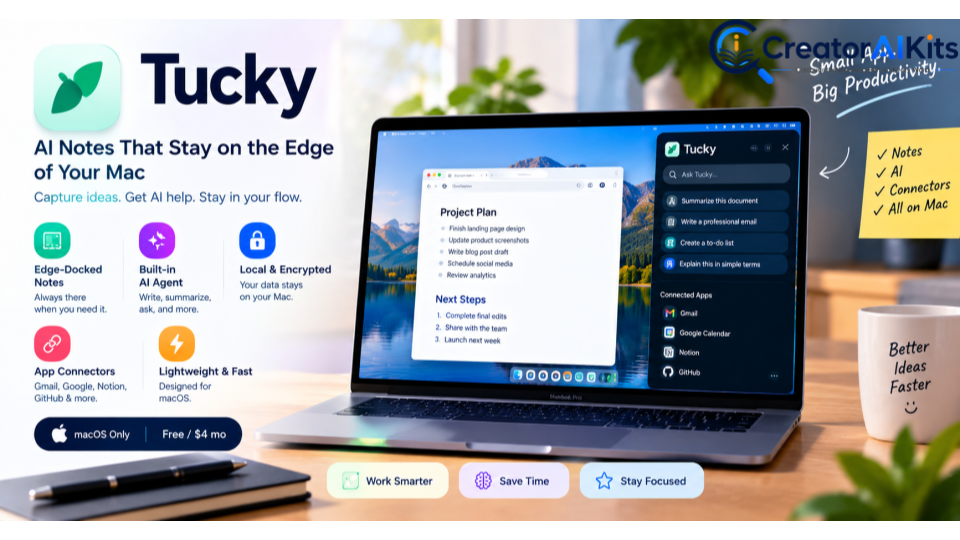
Instead of opening another browser tab every time you want to take a note or ask an AI assistant something, Tucky keeps your notes docked to the edge of your Mac screen.
Its official website describes the product as notes that live at the edge of your screen, with an AI agent available when you need it. Tucky also says notes remain encrypted on your Mac.
Product Hunt ranked Tucky #3 on September 7, 2026.
Why Tucky Is Different
Most note-taking apps make you open the application.
Tucky’s concept is almost the opposite:
The notes stay out of the way until you reach for them.
That can make sense for people who work with multiple applications throughout the day and don’t want another full-size window competing for screen space.
Key Tucky Features
Edge-Docked Notes
Your notes sit along the edge of your Mac display.
When you need one, you can open it without leaving your current workflow.
Built-In AI Agent
Tucky includes an AI agent that can help users work with their notes and connected information.
Its website highlights AI-powered writing, editing, and questions across notes.
Local Encryption
Tucky says notes remain encrypted on the Mac.
For people who care about keeping personal notes and work information locally managed, this is an important differentiator.
Connectors
The Plus plan includes connectors for services including:
- Gmail
- Google Calendar
- Google Docs
- Google Sheets
- GitHub
- Notion
according to Tucky’s current website.
Tucky Pricing
Tucky currently lists:
| Plan | Price | What You Get |
| Free | $0 | Five notes, encrypted on Mac |
| Plus | $4/month | Unlimited notes, AI, voice, connectors and advanced models |
Tucky’s official site currently lists $4/month for Plus and five free notes.
Tucky Platform Requirements
This is an important correction from many generic descriptions of the product:
Tucky is currently a macOS application, not a Windows + macOS application.
Its official site lists macOS 15 or later and support for both Apple silicon and Intel Macs.
Tucky: Pros & Cons
Pros
- Unique edge-docked interface
- Built-in AI agent
- Local encrypted notes
- Useful integrations
- Very inexpensive Plus plan
- Designed around keeping users in their workflow
Cons
- macOS only
- AI features require Plus
- New product with a relatively short track record
Our Verdict on Tucky
Best for: Mac users who want notes and AI assistance without constantly switching applications.
Our take: Tucky’s strongest selling point isn’t simply “AI notes.” The interesting part is the interface philosophy: keep useful information permanently available without letting it dominate the screen.
Routines by Databox: Scheduled AI Analysis for Business Data
5
The third launch targets a completely different audience.
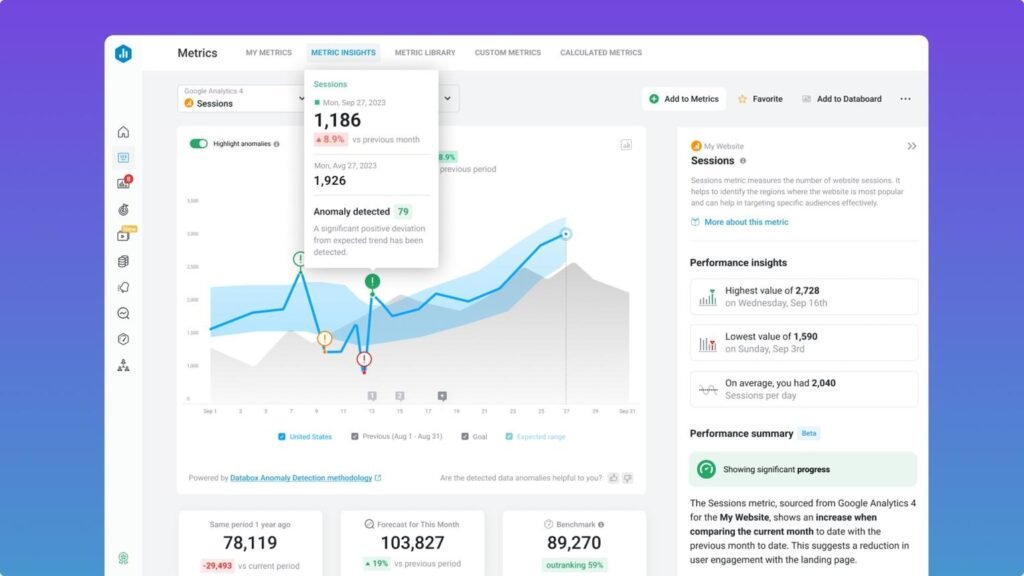
Routines by Databox is designed for businesses that repeatedly perform data analysis and reporting.
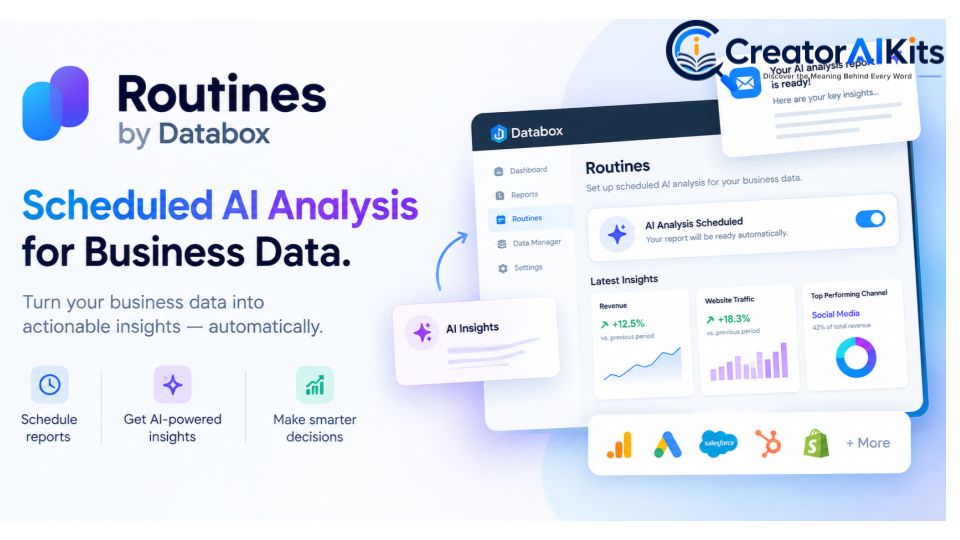
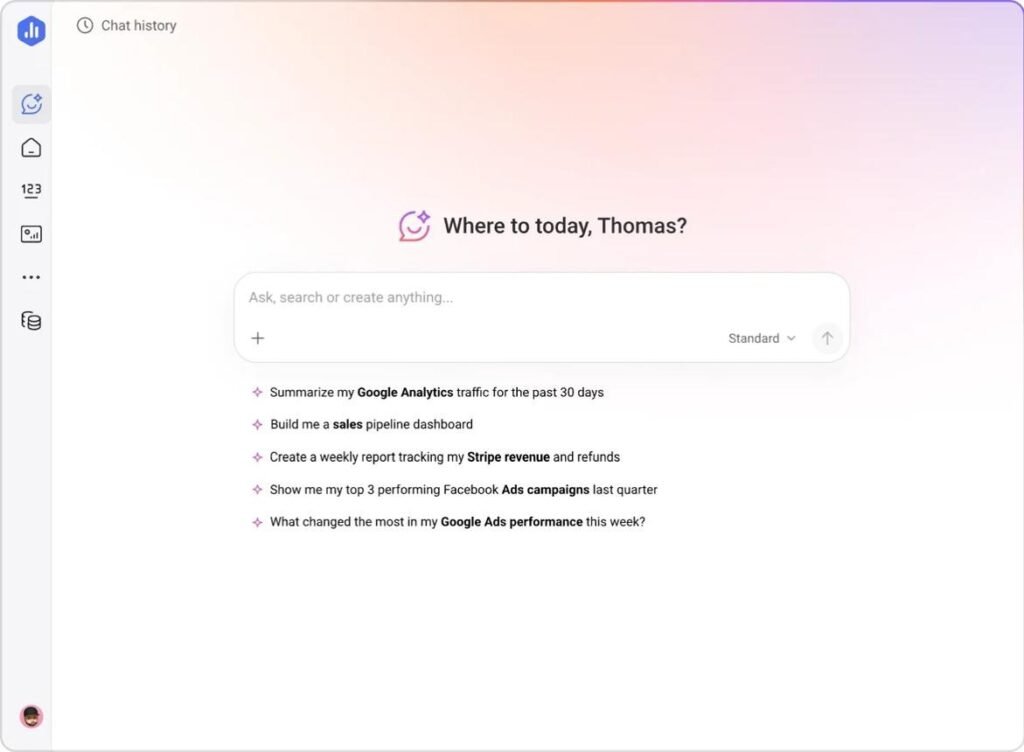
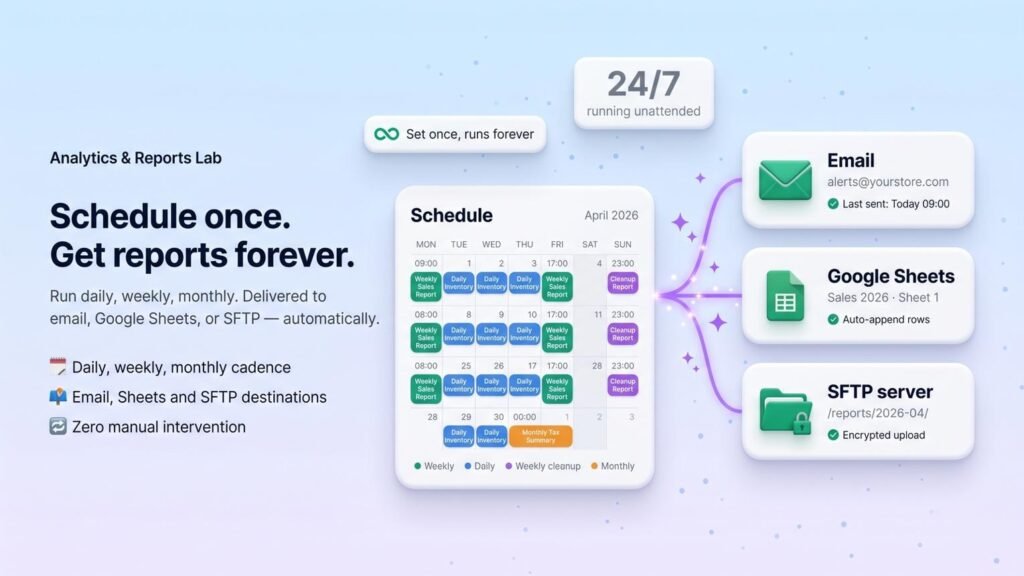
Product Hunt describes it as an AI Analyst that runs analysis and reports on a schedule. Users can give the AI Analyst a prompt and schedule, have it analyze live data, and receive the resulting report or analysis through email, Slack, or the Databox app.
Product Hunt ranked Routines #4 on September 7, 2026.
The Problem Routines Is Trying to Solve
Imagine a marketing team that checks the same metrics every Monday:
- Website traffic
- Leads
- Conversion rates
- Advertising performance
- Revenue
- Campaign performance
Someone has to collect the information, analyze it, identify changes, and write the report.
Routines aims to automate that recurring process.
How Routines Works
A simplified workflow looks like this:
Connect data → Define the analysis → Set a schedule → AI analyzes the data → Receive the result
For example:
“Every Monday, analyze our website traffic and lead-generation performance. Identify the biggest changes from the previous week and highlight anything that needs attention.”
The goal is to turn repetitive analysis into an automated workflow.
Key Routines Features
Scheduled AI Analysis
The core feature is scheduling.
Instead of manually asking the same analytics questions repeatedly, you can configure the AI Analyst to perform the analysis on a recurring basis.
Multiple Delivery Options
Routines can deliver results through:
- Slack
- Databox
according to the Product Hunt launch information.
Live Business Data
Databox positions its AI Analyst around connected business data rather than generic answers. Its platform supports integrations across analytics, marketing, databases, spreadsheets, and other business sources.
AI Analyst + Automation
This is where Routines becomes more interesting than a basic reporting scheduler.
Databox describes its broader platform as combining AI Analyst capabilities with agents and automations designed to turn insights into action.
Routines by Databox Pricing
This is another area where the original article needed correction.
Databox’s current official pricing page lists a Free plan, followed by paid plans such as Analyst, Pro, Growth, and Custom. The exact pricing can change, and Databox currently promotes a 14-day trial.
| Plan | Current Annual-Billing Price | AI Credits / Month | Best For |
| Free | $0 | 50 | Individuals exploring analytics |
| Analyst | $64/month | 500 | Individual analysts |
| Pro | $159/month | 1,500 | Teams |
| Growth | $399/month | 4,000 | Larger analytics workflows |
| Custom | Contact Databox | Custom | Enterprise |
Prices shown are from Databox’s current pricing page and may change. Monthly billing can differ.
Routines: Pros & Cons
Pros
- Automates recurring analysis
- Works with connected business data
- Scheduled reporting
- Email and Slack delivery
- Useful for agencies and marketing teams
- Can reduce repetitive manual reporting
Cons
- More complex than consumer AI apps
- Paid plans become expensive for larger teams
- Requires properly connected and organized data
- Best suited to professional/business workflows
Our Verdict on Routines
Best for: Businesses, agencies, marketers, and analysts who repeatedly perform similar data analysis.
Our take: Routines is the most commercially focused tool of the three. Its value isn’t about generating another AI summary. It’s about turning a repeatable analytical task into an automated process.
Scriptly vs Tucky vs Routines: Which One Is Best?
| Category | Scriptly | Tucky | Routines |
| Primary purpose | Video creation | Notes + AI | Business analytics |
| Best audience | Creators | Mac users | Businesses |
| Platform | iOS | macOS | Web |
| Main innovation | Voice-following teleprompter | Edge-docked AI notes | Scheduled AI analysis |
| Free option | Yes | Yes | Yes |
| Starting paid price | Currently free beta | $4/month | $64/month annual billing for Analyst |
| Best use case | Recording scripted videos | Desktop productivity | Recurring reports |
| Privacy angle | Local storage | Encrypted on Mac | Connected business data |
| Difficulty | Easy | Easy | Moderate |
Which AI Tool Should You Try First?
There is no universal winner.
Choose Scriptly if you’re a content creator
If your biggest problem is reading scripts naturally while recording videos, Scriptly is the obvious choice.
Best for: YouTubers, TikTok creators, Instagram creators, educators, coaches, and video marketers.
Choose Tucky if you’re a Mac user
If you spend most of your day working on a Mac and constantly switch between notes, documents, browsers, and AI tools, Tucky’s edge-based approach could be useful.
Best for: Writers, researchers, developers, students, freelancers, and knowledge workers.
Choose Routines if you’re running a business
If your team repeatedly performs the same analytics checks and prepares similar reports, Routines has the clearest productivity and automation use case.
Best for: Agencies, marketers, business owners, analysts, and reporting teams.
What Makes These AI Launches Interesting?
The most interesting thing about these products isn’t simply that they use AI.
It’s where the AI is being placed.
Scriptly places AI inside the video-creation process.
Tucky places AI inside the desktop note-taking workflow.
Routines places AI inside the business analytics process.
This reflects a broader shift in AI software: instead of asking users to open a chatbot and start a conversation, newer products are increasingly embedding AI into the exact workflow where the problem occurs.
That is why these launches are worth watching.
Final Verdict
If you’re looking for the best new AI tool for creators, start with Scriptly.
If you want a minimal Mac productivity tool with built-in AI, Tucky is the most distinctive option.
If your priority is automated business analytics and recurring reporting, Routines by Databox is the strongest choice.
But don’t choose a tool simply because it is trending on Product Hunt.
The better question is:
Does it solve a problem you repeatedly experience?
That’s the difference between collecting AI tools and actually becoming more productive with AI.
These products are also still relatively new, so pricing, platforms, and features may change. Check the official product page before purchasing or relying on a specific feature.
Frequently Asked Questions
What are the best new AI tools launched this week?
Three notable launches on Product Hunt this week are Scriptly, Tucky, and Routines by Databox. They target different use cases: video creation, Mac productivity, and automated business analytics.
What is Scriptly AI?
Scriptly is an iOS teleprompter app designed around voice-following scrolling. It is intended to help video creators read scripts more naturally while recording.
Is Scriptly free?
At the time of this review, Scriptly is available as a free public beta through TestFlight. Because it is a beta product, its pricing may change.
Is Tucky available for Windows?
No. Tucky currently supports macOS 15 or later and works with both Apple silicon and Intel Macs.
How much does Tucky cost?
Tucky currently has a free plan with five notes. The Plus plan costs $4 per month and adds AI, voice, connectors, and additional functionality.
What is Routines by Databox?
Routines is a Databox feature that lets users schedule recurring AI analysis and reports based on connected business data. Results can be delivered through email, Slack, or the Databox app.
Is Routines by Databox free?
Databox has a free plan, while more advanced analytics capabilities are available through paid plans. Its current pricing page also advertises a 14-day trial.
Which of these AI tools is best for marketers?
For marketers, Routines by Databox is the strongest choice if the goal is recurring analytics and reporting. Scriptly is more useful for marketers who primarily create video content.
SEO & E-E-A-T Publishing Checklist
For your CreatorAIKits.com article, I would do these before publishing:
1. Add a real author byline
Example:
Written by [Author Name] — AI Tools & Technology Writer
Google specifically recommends clear authorship and author information where readers would reasonably expect it.
2. Add a “How We Research AI Tools” box
Use something like:
How we review AI tools: We verify product information using official product pages and current launch listings, compare pricing and platform availability, and distinguish verified features from our editorial assessment. Product information can change as new tools evolve.
This is particularly valuable for a fast-changing “new AI tools” article.
3. Add official source links
I recommend linking naturally to:
- Product Hunt’s September 7 leaderboard
- Scriptly’s Product Hunt listing
- Tucky’s official website
- Databox’s official pricing
- Databox’s AI Analyst/Routines information
That gives readers a path to verify important claims.
4. Add 3 original screenshots
This is very important for E-E-A-T.
Don’t just use random images from Google.
Ideally, take screenshots yourself of:
- Scriptly
- Tucky
- Routines/Databox
Google’s current guidance specifically says original information, research, analysis, and first-hand experience can make content more valuable than simply rewriting what’s already online.
5. Add video — but don’t use a random video
Google says high-quality, relevant images and video can create additional opportunities in generative search.
For this article, I’d use one relevant official/product demonstration video, preferably from Databox for the Routines section if an appropriate current video is available.
Don’t embed a video just for SEO.
6. Don’t promise a “90+ Google score”
One important correction to what you asked earlier: there is no official Google “90+ article score.”
Yoast, Rank Math, AIOSEO, etc. can give an SEO score, but that score is not a Google ranking score.
What we can aim for is:
90%+ on your SEO plugin + excellent content quality + strong E-E-A-T + technically sound page + satisfying search intent.
Google itself says that even following its best practices does not guarantee crawling, indexing, or ranking.
7. Don’t keyword-stuff
Use the primary keyword naturally in:
- H1
- introduction
- one or two H2s where appropriate
- title/meta
- URL
- image alt text where genuinely descriptive
Google says its language systems can understand related searches without requiring you to force every exact keyword onto the page.

Welcome to CreatorAIKits! I’m passionate about learning and exploring AI tools, creativity, and technology.
I’m continuously researching and gaining hands-on experience with different AI tools and technologies.
My goal is to share simple, useful, and practical AI information for beginners and everyday users.
Thanks for visiting CreatorAIKits!