

Writing a blog post is easier than ever. With free AI writing tools, you can turn a simple idea into a draft in minutes. But there is one problem: a fast article is not always a good article.
You have probably seen blog posts that look polished at first but offer little useful information. They repeat familiar advice, use generic examples, and leave readers with the same questions they had before. Publishing more content will not solve that problem if every article feels the same.
So, how can you use free AI writing tools to create blog posts that sound natural, answer real questions, and give readers a reason to trust your website?
The answer is to use AI as an assistant, not as a replacement for your judgment. Start with what your readers want to know, use AI to organize your ideas and prepare a first draft, then improve the article with accurate research, clear examples, careful editing, and genuine experience.
In this guide, you will learn how to write blog posts using free AI writing tools, which mistakes to avoid, how to make AI-assisted writing sound more natural, and how to prepare your content for SEO without relying on unrealistic promises about Google rankings or AI detection.
The goal is simple: spend less time staring at a blank page and more time creating content that actually helps your readers.
Quick Answer: How Do You Write a Blog Post With Free AI Tools?
Start by understanding the reader’s search intent, then use a free AI writing tool to help with research, outlining, brainstorming, or a first draft. After that, manually improve the content, verify important facts, add genuine examples or first-hand experience, and optimize the final article for readability and search.
The key is simple:
AI helps you work faster. Human judgment makes the content worth publishing.
Can AI-Written Blog Posts Rank on Google?
Yes, AI-assisted content can appear in Google Search.
But using AI does not automatically make an article good—or bad.
What matters is the value of the finished page.
Google’s guidance emphasizes helpful, reliable, people-first content. It also warns against producing large amounts of unoriginal content primarily to manipulate search rankings.
So instead of asking:
“How can I make AI content rank?”
ask:
“How can I make this the most useful answer for someone searching for this topic?”
That is a much stronger SEO mindset.
Pro Tip: Writing a good blog post is only one part of building a successful website. You also need a clear plan for choosing topics, understanding search intent, and connecting related articles. Read our guide on How to Build an AI Content Strategy in 2026 to learn how to organize your content and create a more focused SEO strategy.
Step 1: Start With Search Intent, Not the Writing Tool
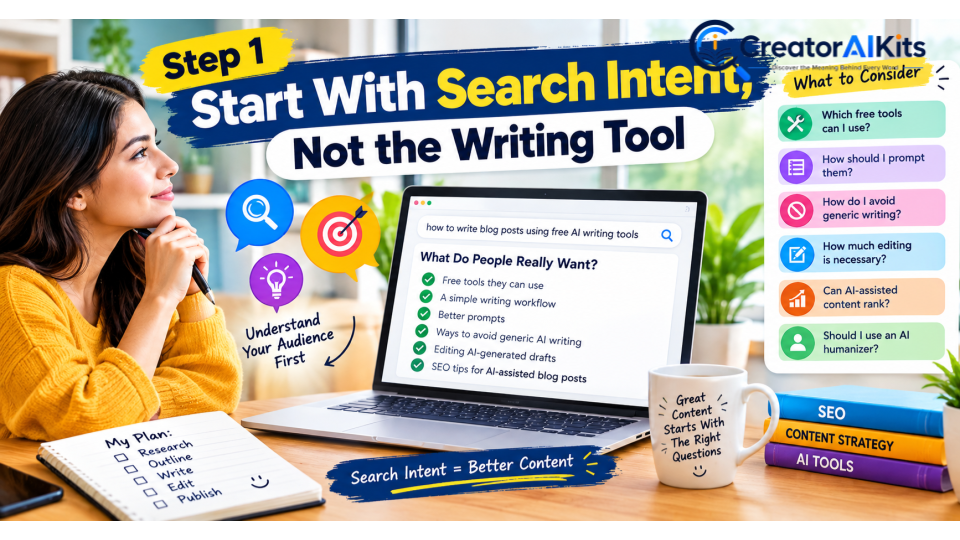
Before opening ChatGPT, Claude, Gemini, or another AI writing tool, figure out what the reader actually wants.
For the search:
“how to write blog posts using free AI writing tools”
the reader may be looking for:
- Free tools they can use
- A simple writing workflow
- Better prompts
- Ways to avoid generic AI writing
- Advice on editing AI-generated drafts
- Information about AI detectors
- Ways to add human experience
- SEO tips for AI-assisted blog posts
These questions should shape your article.
Why Search Intent Matters
A well-written article can still struggle if it answers the wrong question.
For example, someone searching for a step-by-step blogging workflow does not necessarily want a long history of artificial intelligence.
They want to know:
What should I do first? What should I do next? What should I avoid?
Give them that answer quickly.
Step 2: Build a Simple Content Outline
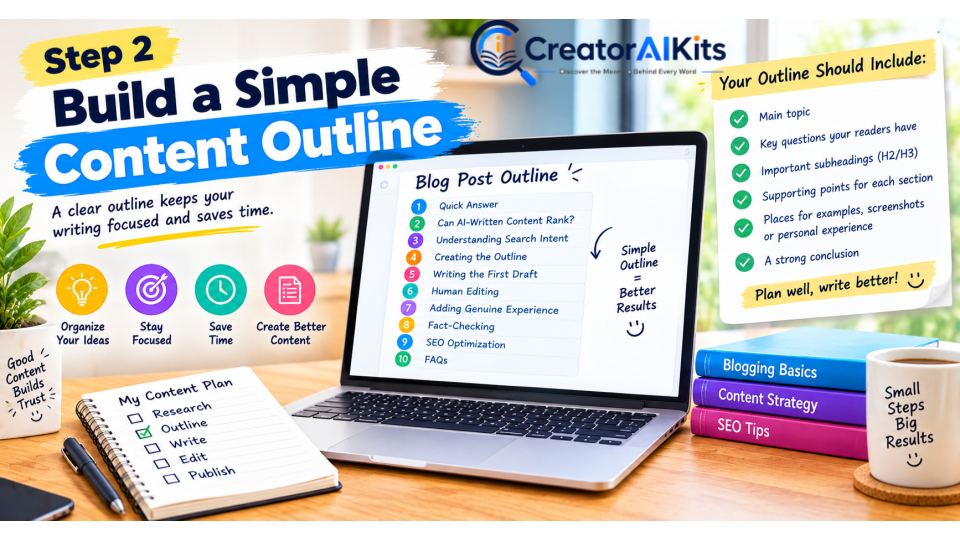
Do not ask AI to immediately produce a huge article.
Start with a useful structure.
For this topic, a strong outline could be:
- Quick answer
- Can AI-written content rank?
- Understanding search intent
- Creating the outline
- Writing the first draft
- Human editing
- Adding genuine experience
- Fact-checking
- SEO optimization
- AI detectors and humanizers
- Final publishing checklist
- FAQs
You do not need 30 different headings.
A smaller number of useful sections usually creates a smoother reading experience.
Step 3: Use AI for the First Draft, Not the Final Word
One of the easiest ways to improve AI-assisted writing is to give the tool better instructions.
Instead of writing:
Write a 2,000-word blog post about AI writing tools.
give it more context.
A Better Prompt
Write a practical blog post for beginners who want to use free AI writing tools to create better website content. Keep the language simple, conversational, and useful. Avoid generic introductions, unnecessary filler, exaggerated claims, and repetitive phrases. Use clear examples and explain ideas in a way a beginner can understand. Do not invent statistics, personal experiences, test results, prices, or product features. Clearly flag information that should be verified before publication.
This gives the AI a much clearer job.
It also reduces the risk of ending up with a long article full of information that sounds impressive but does not help the reader.
Step 4: Never Publish the First AI Draft
This is one of the most important steps.
An AI-generated draft is usually a starting point.
Read it carefully and ask:
Does this sound like a real person wrote it?
If every paragraph has the same rhythm, rewrite some of them.
Does every paragraph add something?
If a paragraph only repeats the previous point, remove it.
Are the examples specific?
Replace vague statements with practical examples.
Are the claims accurate?
Check anything involving statistics, pricing, product features, policies, or current information.
Does the article offer something original?
If the same information appears on ten competing websites, look for a way to add more useful analysis.
Step 5: Make the Writing Sound Natural
Natural writing does not mean making every sentence complicated.
In fact, good web writing is often simple.
For example:
Generic:
In today’s rapidly evolving digital landscape, leveraging cutting-edge AI technology is essential for businesses seeking to maximize their content creation potential.
Natural:
AI can save you a lot of writing time, but only if you use it as an assistant rather than letting it make every decision for you.
The second sentence is easier to understand and gets to the point faster.
Watch for Repetitive AI-Style Phrases
Be careful with phrases such as:
- In today’s fast-paced world
- In the ever-evolving digital landscape
- It is important to note
- Furthermore
- Moreover
- In conclusion
- Unlock the power of
- Take your content to the next level
- Game-changing
- Revolutionary solution
There is nothing automatically wrong with these phrases.
The problem is using them repeatedly when a simpler sentence would communicate the same idea.
Instead of adding impressive-sounding language, say what you actually mean.
Step 6: Add Genuine Human Experience
This is where an AI-assisted article can become much more valuable.
If you have actually used a tool, explain what you noticed.
For example:
I found the tool useful for turning rough notes into an outline, but I still had to rewrite several sections because the first version felt too general.
That is much more useful than:
This is an excellent tool for content creation.
What Can You Add?
Depending on what you actually experienced, you can include:
- Your workflow
- What worked well
- What did not work
- A real example
- Screenshots
- Before-and-after edits
- Problems you encountered
- Time-saving observations
- Limitations you noticed
Never Invent Experience
This is extremely important.
Do not write:
“I tested 15 tools for 40 hours.”
unless you actually did that.
Do not create fake screenshots.
Do not invent test scores.
Do not claim personal experience that you do not have.
Real experience is valuable precisely because it is real.
Step 7: What About AI Humanizers?
AI humanizers are often promoted as tools that can make AI-generated text appear more human.
But you should be careful with claims that a tool can make content 100% undetectable.
AI detectors do not always agree with one another, and their results can change depending on the text and the detector being used.
So a perfect detector score should not be the goal of your content strategy.
What Should You Do Instead?
Read the article yourself.
If a sentence sounds unnatural, rewrite it.
If a paragraph is repetitive, shorten it.
If an example is vague, make it specific.
If a claim is unsupported, verify it or remove it.
That is real editing.
A humanizer may change wording, but it cannot automatically add genuine expertise, original research, or personal experience.
Step 8: Fact-Check the Information Before Publishing
AI writing tools can produce convincing information that is outdated or incorrect.
Always verify information that can change.
This includes:
- Pricing
- Free-plan limits
- Product features
- Model names
- Availability
- Integrations
- Word limits
- Commercial-use conditions
- Copyright-related information
- Search-engine policies
- Current statistics
For software-related articles, check the company’s current documentation or pricing page when the information is important to your recommendation.
A statement that was correct several months ago may no longer be correct today.
Step 9: Optimize the Article for SEO Naturally
SEO should help search engines understand your article without making the writing awkward.
For this article, the primary topic is:
how to write blog posts using free AI writing tools
You can naturally use related phrases such as:
- free AI writing tools
- AI blog writing
- AI-assisted writing
- AI-generated content
- human-sounding AI writing
- AI content workflow
- writing blog posts with AI
- AI writing for SEO
- AI content editing
- AI writing workflow
You do not need to repeat the exact keyword in every heading.
Use the Main Topic in Important Places
Naturally include the primary topic in:
- The title
- H1
- Introduction
- One or two relevant subheadings
- Body content
- Meta description
- URL, where appropriate
But do not force it.
If the sentence sounds unnatural after adding a keyword, rewrite the sentence.
Step 10: Give Readers Something Beyond a Generic AI Summary
This is where your article can compete more effectively.
Instead of only explaining what AI writing tools do, show readers how to use them.
A Practical Workflow
Topic
↓
Search intent
↓
Research
↓
Outline
↓
AI-assisted draft
↓
Human editing
↓
Fact-checking
↓
SEO optimization
↓
Final review
↓
Publish
This is much more useful than:
Keyword → AI → Publish
The second process is fast.
The first process produces better content.
Step 11: Use Screenshots as Evidence—When They Are Real
Screenshots can make a tutorial easier to follow.
For example, you can show:
- The prompt you used
- The first AI draft
- Your edited version
- A tool’s interface
- A real workflow
- A before-and-after example
But screenshots should support the article rather than simply decorate it.
If you show a test result, make sure the test actually happened.
If you show a tool’s pricing, make sure the information is current.
If you show your own experience, make sure it is genuinely yours.
Step 12: Build Internal Links Around the Topic
Because this article sits naturally within an AI-tools website, it should connect to other relevant pages on your site.
For example, readers who want to improve their overall AI workflow can continue to your guide on How to Use AI Tools Effectively in 2026.
Readers interested in the broader content-production workflow can also explore your AI Content Strategy content.
The links should feel useful rather than forced.
For example:
If you want a broader framework for choosing tools, writing better prompts, checking AI output, and improving your workflow, see our guide to How to Use AI Tools Effectively in 2026.
That is much more natural than dropping an unrelated internal link into the middle of a paragraph.
Step 13: Should You Try to Beat AI Detectors?
Not as your main SEO strategy.
An AI detector score is not the same thing as content quality.
A detector can tell you how its system classified a piece of text. It cannot tell you whether your article is:
- Accurate
- Helpful
- Original
- Well researched
- Relevant
- Trustworthy
- Better than competing content
Those are much more important questions.
So instead of asking:
“How do I get 100% human?”
ask:
“How do I make this article genuinely useful?”
That is the better long-term strategy.
Can Google Penalize AI-Assisted Content?
Google does not simply say that content is bad because AI was involved.
The bigger concern is low-value content created primarily to manipulate Search.
Google’s people-first guidance emphasizes useful, reliable content, original value, appropriate first-hand experience, and a clear understanding of who created the content and why.
That means AI can be part of a legitimate workflow.
The problem starts when AI becomes a shortcut for producing large amounts of pages that offer little original value.
For a website like CreatorAIKits.com, the stronger approach is to use AI to speed up research and production while keeping human judgment at the center.
A Simple Free AI Blog-Writing Workflow
If you are working with a limited budget, you can keep the process straightforward.
1. Choose the topic
Start with a real reader problem.
2. Understand search intent
Find out what the person actually wants to accomplish.
3. Research the topic
Use reliable sources and identify information that needs verification.
4. Create the outline
Organize the answer before generating a full draft.
5. Generate the first draft
Use your preferred free AI writing tool as an assistant.
6. Rewrite the weak sections
Remove repetition and generic wording.
7. Add genuine experience
Include your own observations, examples, screenshots, or testing where appropriate.
8. Verify important information
Check prices, features, statistics, policies, and other changing facts.
9. Optimize for SEO
Improve the title, headings, internal links, meta description, images, and overall readability.
10. Read the article one final time
Read it as if you are the person who searched for the topic.
If you would still find the article useful without knowing how it was created, it is much closer to being ready.
How to Make AI-Assisted Content More Trustworthy
Before publishing, ask yourself five questions.
1. Is it accurate?
Have the important claims been checked?
2. Is it original?
Does the article provide something beyond a rewritten version of existing pages?
3. Does it demonstrate experience?
Where appropriate, have you included genuine examples, observations, screenshots, or testing?
4. Is the author clear?
Can readers understand who created the article?
5. Is it genuinely useful?
Does the reader get a complete answer without immediately needing to search for another article?
These questions are more valuable than trying to achieve an arbitrary AI-detector score.
Final SEO and Quality Checklist
Before pressing Publish, check every item below.
Search Intent
- The article answers the main search question.
- The answer appears early.
- The article stays focused on the topic.
- The content is useful for the intended reader.
Content Quality
- The information is accurate.
- Important claims have been verified.
- The article contains useful examples.
- Repetitive sections have been removed.
- There is genuine original value.
- No fake testing claims have been added.
Human Readability
- The introduction gets to the point.
- Sentences are easy to understand.
- Paragraphs are not unnecessarily long.
- Generic filler has been removed.
- The tone feels natural and conversational.
- The article does not sound overly promotional.
E-E-A-T
- The author is clearly identified.
- Genuine experience is included where appropriate.
- Important information is supported by reliable sources.
- Product information is current.
- No credentials or experience have been invented.
SEO
- The title accurately represents the article.
- The H1 is clear.
- H2 and H3 headings are logical.
- The primary topic appears naturally.
- Related terms are used naturally.
- Relevant internal links are included.
- The meta title is optimized.
- The meta description is compelling and accurate.
- Images have descriptive alt text.
- The URL is short and relevant.
Frequently Asked Questions
Can I write blog posts using free AI writing tools?
Yes. Free AI writing tools can help with research, brainstorming, outlines, drafting, rewriting, and editing. The strongest results usually come from combining AI assistance with human review and fact-checking.
Can AI-assisted content rank on Google?
Yes. AI assistance itself does not determine whether an article is useful. The finished content still needs to satisfy the reader, provide value, follow Google’s quality and spam guidelines, and avoid being produced primarily to manipulate Search.
What is the best way to make AI writing sound human?
Focus on good editing rather than simply trying to fool an AI detector. Remove generic phrases, add specific examples, vary sentence structure naturally, include genuine experience, and rewrite anything that does not sound like your normal voice.
Is AI-generated content always detectable?
No single AI detector can provide a universal guarantee about whether text is AI-generated or human-written. Different detection systems can produce different results, so detector scores should not be treated as a definitive measure of authorship.
Should I use an AI humanizer?
You can experiment with one, but do not rely on it as your main editing method. Always review the output afterward to make sure the meaning, accuracy, and readability have not been damaged.
How much of a blog post should be written by AI?
There is no universal percentage that makes an article good or bad. Use AI where it genuinely saves time, while keeping human control over research, judgment, fact-checking, original insights, editing, and the final publishing decision.
Should I add personal experience to AI-assisted articles?
Yes, when the experience is genuine and relevant. Real observations, examples, screenshots, and documented testing can make an article more useful and demonstrate first-hand knowledge.
Can AI replace a human blogger?
AI can handle many repetitive writing tasks, but it does not replace human judgment. Someone still needs to decide what the reader needs, verify important information, evaluate the quality of the output, and add original perspective.
Final Thoughts: Use AI to Work Faster, Not to Remove the Human From Your Content
Free AI writing tools can save bloggers a huge amount of time.
But the fastest article is not always the best article.
A strong blog post usually comes from a simple combination:
Good research + AI assistance + human judgment + genuine experience + careful editing.
Use AI to brainstorm.
Use it to organize ideas.
Use it to create a first draft.
Use it to find gaps and improve clarity.
But then take over.
Check the facts. Rewrite the weak sections. Add examples that actually help. Include your real experience where relevant. Remove anything that sounds generic.
And before publishing, ask yourself one final question:
If Google disappeared tomorrow, would I still be proud to put this article on my website?
If the answer is yes, you are creating the kind of content that has a much stronger foundation for long-term search visibility.
The goal is not to create content that tricks a detector.
The goal is to create content that earns a reader’s trust.
That is the approach worth building your AI content strategy around in 2026.

Welcome to CreatorAIKits! I’m passionate about learning and exploring AI tools, creativity, and technology.
I’m continuously researching and gaining hands-on experience with different AI tools and technologies.
My goal is to share simple, useful, and practical AI information for beginners and everyday users.
Thanks for visiting CreatorAIKits!