
Writing a university research paper can be challenging, especially when you need to review dozens of academic articles, compare research findings, identify limitations, and keep your references organized. Google NotebookLM can make this process more manageable by helping you understand and analyze the documents you provide.
If you want to learn how to use NotebookLM for university research papers free, you can start with a Google account, create a notebook, and upload your research sources. You can then ask questions about your documents, generate summaries, compare different authors’ arguments, and locate supporting passages with source citations.
However, NotebookLM is not a replacement for academic research or critical thinking. Its answers can contain mistakes, and citations still need to be checked against the original publications.
This guide explains how to use NotebookLM for assignments, literature reviews, dissertations, and thesis preparation. You will also find practical prompts, a comparison with other AI assistants, student experiences discussed on Reddit, and a workflow for checking your research before submission.
Why University Students Use NotebookLM for Research
Research often involves more than reading a single article. Students may need to understand conflicting findings, organize evidence from several papers, and identify what previous studies have not fully addressed.
NotebookLM is useful because it grounds its responses in the sources added to a notebook and provides citations that help users trace information back to those materials.
Here are some practical ways students can use it:
- Summarize research papers: Understand the purpose, methodology, findings, and limitations of a long academic article.
- Compare multiple studies: Identify where researchers agree, disagree, or use different methods.
- Find supporting evidence: Locate passages relevant to a research question or argument.
- Prepare for exams: Turn lecture notes and academic documents into study guides, flashcards, quizzes, or audio summaries where available.
- Organize literature reviews: Group related findings and create an initial outline for further investigation.
NotebookLM’s usefulness depends heavily on the quality and relevance of your sources. Uploading reliable academic papers is a better starting point than relying on random documents from the internet.
What Reddit Users Say About NotebookLM for Academic Research
Reddit discussions can provide useful examples of how students and researchers use AI tools in real study workflows. However, individual posts are personal experiences, not controlled tests or proof that a tool always produces accurate results.
In a Reddit discussion about maximizing NotebookLM for academic research, users discussed using the tool to understand papers, compare evidence, investigate possible research gaps, and review cited passages. One recurring recommendation was to read and understand the sources first, then use NotebookLM to support further analysis rather than accepting its answers without checking them.
A separate Reddit post about using NotebookLM for a research paper described a workflow involving uploaded journal articles, comparisons between studies, research outlines, and manual verification of claims.
The practical lesson is straightforward: use NotebookLM to understand evidence more efficiently, not to avoid doing the research yourself.
These discussions are anecdotal and do not establish a universal accuracy rate. Your results will depend on the documents you upload, the questions you ask, and how carefully you verify the output.
Step-by-Step Guide to Using NotebookLM for University Research Papers
Step 1: Create a NotebookLM Account
Visit Google NotebookLM and sign in with your Google account. Follow the instructions displayed on the website to create a new notebook.
Think of a notebook as a workspace for one research project. For example, you could create separate notebooks for a literature review, a dissertation chapter, and an upcoming university assignment.
Tip: Give each notebook a descriptive name, such as “Climate Change Literature Review” or “Marketing Research Thesis.” This makes your sources easier to organize.
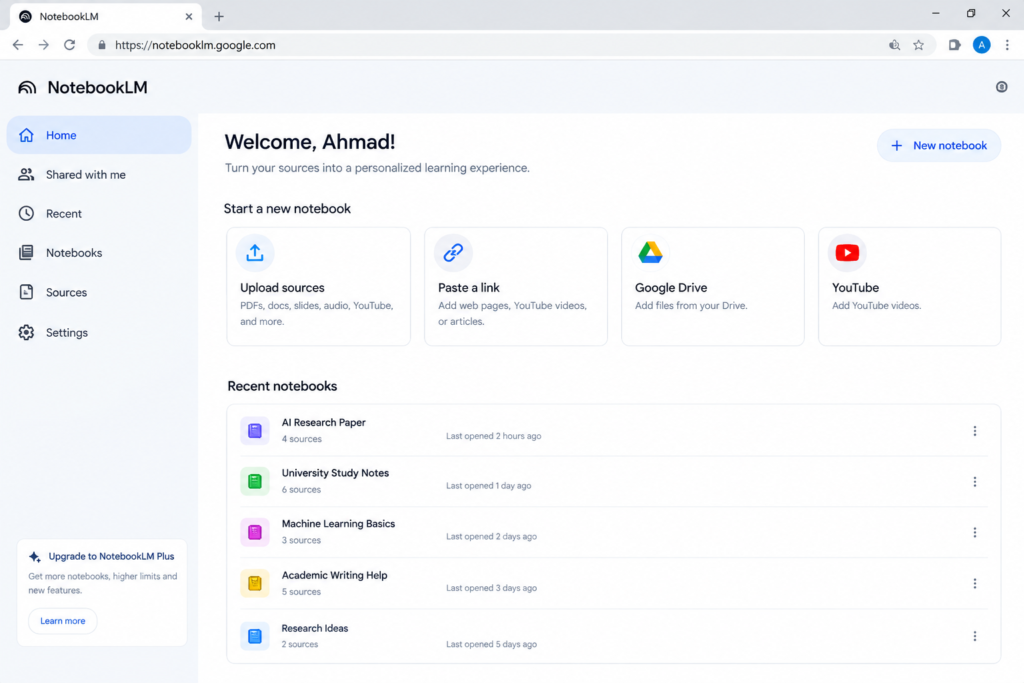
Suggested image caption: Creating a research workspace in Google NotebookLM.
Step 2: Upload Your Research Papers and Academic Sources
After creating your notebook, use the available source options to add your materials. Depending on the current interface and supported formats, these may include:
- PDF research papers and academic reports
- Google Docs and Google Slides
- Supported website URLs
- Public YouTube videos with accessible transcripts
- Supported audio files and other source formats
For university research, prioritize peer-reviewed journal articles, official reports, primary documents, and sources recommended by your supervisor.
You can discover academic papers through Google Scholar, your university library, and relevant academic databases. Check each paper’s publication details and relevance before adding it to your notebook.
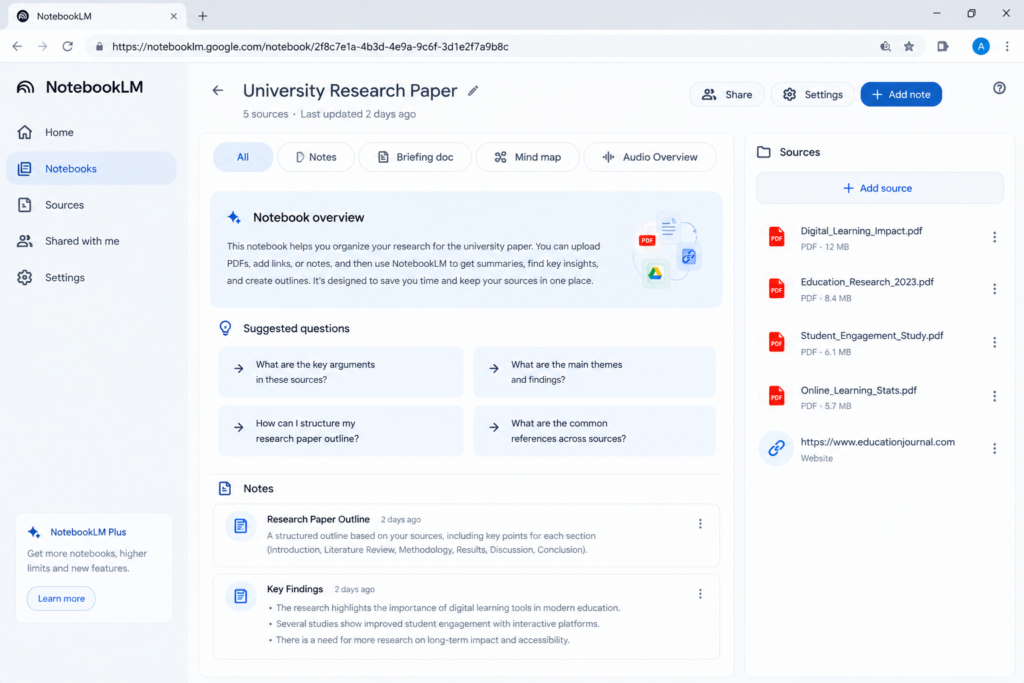
Suggested image caption: Adding research papers and academic documents to a NotebookLM project.
Important: NotebookLM’s source limits and supported formats can change. Check the current limits displayed in your account rather than relying on an outdated source-count or word-count claim.
Step 3: Ask Specific Questions About Your Research Papers
Once your sources are ready, use the chat interface to ask focused questions.
Instead of asking, “Explain everything about these papers,” start with a question that has a clear research purpose.
For example:
- “Summarize the research objective, methodology, main findings, and limitations of this paper.”
- “Which findings are supported by the strongest evidence in these sources?”
- “Compare the conclusions of these three studies and explain their main differences.”
- “Find the passages that discuss limitations in the methodology.”
- “Which claims in my draft are not clearly supported by the uploaded sources?”
NotebookLM can provide source citations that help you investigate the supporting material. Click the relevant citations and check the original passage before using the information in your assignment.
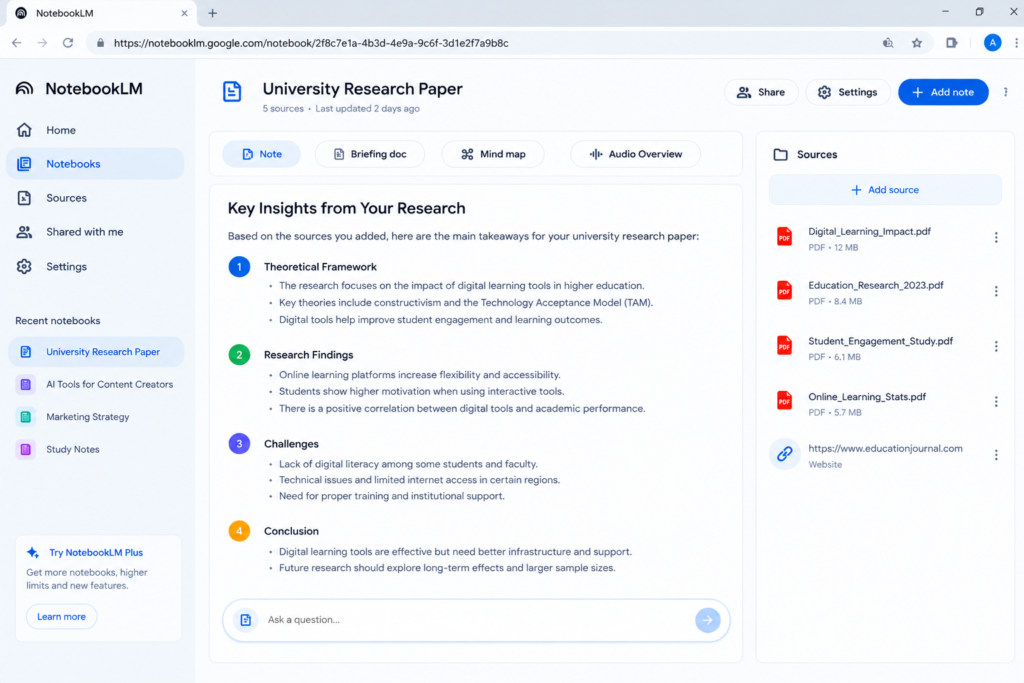
Suggested image caption: Using source-grounded questions to analyze academic research in NotebookLM.
Step 4: Use NotebookLM to Support a Literature Review
A literature review should do more than summarize papers one by one. It should explain patterns, differences, limitations, and relationships between existing studies.
NotebookLM can help you build an initial evidence map.
Try this prompt:
Based only on the uploaded academic sources, create a literature review evidence table. For each study, identify the author and year where available, research question, methodology, sample or dataset, key findings, limitations, and relevance to my research question. Cite the supporting source for each entry. If information is missing, write “Not stated in the source” rather than guessing.
After receiving the response, verify the details against the original papers.
Next, use this prompt:
Compare the major findings across these studies. Identify areas of agreement, disagreement, methodological differences, and unanswered questions. Support each point with citations to the uploaded sources. Do not claim that a research gap exists unless the evidence supports that conclusion.
This approach gives you a structured starting point for your own critical analysis. It does not automatically establish that a proposed research gap is original or important; you will still need to investigate the wider academic literature.
Step 5: Organize Your Findings Into an Assignment Outline
Before writing full paragraphs, organize your evidence into a logical structure.
You can ask NotebookLM to suggest an outline based on your assignment requirements and uploaded sources.
Example prompt:
Create a structured outline for a university research paper about [insert topic]. Include an introduction, research background, major themes from the literature, conflicting findings, research limitations, discussion, and conclusion. Under each section, list the evidence from my sources that may be relevant. Do not invent facts, citations, or references. Identify areas where additional research is needed.
Compare the proposed outline with your university’s instructions. If your supervisor has provided a specific structure, follow that structure rather than automatically accepting the AI-generated version.
Pro Tip: Use NotebookLM More Effectively for Academic Research
Before using NotebookLM for your university research paper, upload reliable academic sources, such as research papers, lecture notes, and relevant PDFs. Ask focused questions, compare findings across sources, and verify important claims against the original documents before including them in your work. NotebookLM can help organize your research, but your own critical thinking and proper citations remain essential.
Want to get more out of AI tools? Read our guide on How to Use AI Tools Effectively in 2026: 10 Practical Steps] to learn how to choose the right tools, write better prompts, and review AI-generated results.
Best NotebookLM Prompts for University Assignments and Thesis Research
The following prompts can help you get more specific, useful answers from your documents.
| Research task | Prompt to copy |
| Paper summary | “Summarize this paper’s research question, methodology, findings, and limitations. Cite the relevant passages.” |
| Comparing studies | “Compare the main arguments and findings across these sources. Explain where the authors agree and disagree.” |
| Finding evidence | “Locate passages that support my research question and explain how each passage is relevant.” |
| Identifying limitations | “List the limitations explicitly mentioned by the authors. Separate stated limitations from your own possible interpretations.” |
| Exploring research gaps | “Identify questions that remain unanswered in the uploaded sources. Explain what evidence supports each possible gap.” |
| Preparing for exams | “Create a study guide with key concepts, definitions, short-answer questions, and answers based on my uploaded materials.” |
| Checking a draft | “Review my draft against the uploaded sources. Flag unsupported claims, inaccurate summaries, and citations that need verification.” |
| Planning a presentation | “Create a presentation outline using the key findings in these documents. Include source references for the main claims.” |
Pro tip: Add your research question and assignment instructions to the prompt. Asking the tool to distinguish between confirmed evidence, reasonable interpretation, and missing information can make the results easier to evaluate.
NotebookLM vs. ChatGPT vs. Claude for University Research
These tools serve overlapping but different purposes. The best option depends on whether you need source-based analysis, broader writing assistance, or help developing an argument.
| Feature | Google NotebookLM | ChatGPT | Claude |
| Main strength | Analyzing a selected collection of sources | General research assistance, reasoning, and writing | Writing, reasoning, and working with provided documents |
| Source-based answers | Designed to ground responses in added sources | Depends on the workflow, available tools, and provided context | Depends on the workflow and provided context |
| Source citations | Provides citations linked to notebook sources | Citation availability and format depend on the tools used | Citation availability and format depend on the tools used |
| Study materials | Supports features such as study guides, quizzes, and audio or video learning tools where available | Can help create study questions and explanations | Can help create study questions and explanations |
| Academic writing | Useful for organizing and understanding evidence | Useful for drafting, revising, and explaining ideas | Useful for drafting, revising, and explaining ideas |
| Free access | Free access is available, subject to current limits | Free access is available, subject to current limits | Free access is available, subject to current limits |
Feature availability, usage limits, and paid plans may change. Check each provider’s current official website before making a purchasing decision.
Which tool should you choose?
- Choose NotebookLM when you want to investigate a collection of academic sources and trace answers back to those materials.
- Choose ChatGPT when you need help explaining concepts, developing an argument, or revising a draft.
- Choose Claude when you want another option for working through lengthy documents, reasoning, and improving written work.
You can also combine tools, but verify the facts and references independently. No AI assistant should be treated as a substitute for reading important academic evidence.
Common Mistakes to Avoid When Using NotebookLM
NotebookLM can save time, but an unreliable workflow can still produce weak academic work.
- Uploading poor-quality sources: Incorrect, outdated, or irrelevant documents can lead to misleading conclusions.
- Trusting every answer: AI-generated summaries can omit important context or misinterpret evidence.
- Copying citations without checking them: Open the original source and confirm the wording, author, year, page details, and relevance.
- Treating possible research gaps as proven gaps: A gap in your uploaded documents may already have been addressed elsewhere.
- Submitting AI-generated text without review: Follow your university’s AI-use and academic integrity policies.
- Ignoring privacy requirements: Check your institution’s rules before uploading unpublished research, confidential records, identifiable participant information, or restricted documents.
NotebookLM can support your workflow, but the responsibility for your submitted work remains yours.
How to Verify Citations and Prepare Your Final Research Paper
Before submitting your assignment or thesis chapter, complete these checks:
- Open every important citation. Confirm that the cited passage supports the claim you want to make.
- Check the original publication. Verify author names, publication dates, article titles, page numbers, and DOI details where applicable.
- Format references separately. Use your required citation style, such as APA 7, MLA, or Chicago. Treat AI-generated reference formatting as a draft that needs checking.
- Review the argument yourself. Make sure the paper explains why the evidence matters instead of merely listing summaries.
- Check your institution’s rules. Follow the requirements for disclosure, citation, and permitted AI assistance.
For reference management, a dedicated tool such as Zotero may help you organize publication details and generate citations. NotebookLM can assist with understanding sources, while a reference manager can help maintain a more systematic bibliography.
Frequently Asked Questions
Is Google NotebookLM free for university students?
NotebookLM offers free access, but features and usage limits may vary or change. Check the current official NotebookLM website for the latest details. Do not assume every feature or usage level is unlimited.
Can NotebookLM write a complete university research paper?
It can help organize evidence, generate outlines, summarize research, and develop study materials. However, you should not treat its output as a finished academic paper. Read the original sources, develop your own analysis, and follow your university’s academic integrity policy.
Does NotebookLM provide accurate academic citations?
NotebookLM provides source-linked citations intended to help you trace its answers to your uploaded material. These citations are useful, but they do not guarantee that every interpretation, quotation, or reference detail is correct. Always verify important claims against the original document.
Can NotebookLM format references in APA or MLA style?
You can ask it to help organize reference information or draft citations in a specified style. However, you should independently verify the bibliographic details and formatting against the official style requirements.
Can NotebookLM identify research gaps for a thesis?
It can help identify unanswered questions, inconsistent findings, and limitations within your uploaded sources. However, a genuine research gap requires broader literature checking and your own critical evaluation.
Is it safe to upload university research papers to NotebookLM?
Review Google’s current privacy information and your university’s data-handling requirements before uploading sensitive documents. Do not upload confidential, restricted, or personally identifiable research data unless you have permission and the appropriate safeguards.
Does NotebookLM guarantee zero plagiarism?
No. NotebookLM does not guarantee a zero-plagiarism result. You must cite the original sources, write and review your work responsibly, and follow your institution’s rules on originality and AI assistance.
Final Verdict: Is NotebookLM Worth Using for University Research?
Google NotebookLM can be a useful assistant for university students who need to understand complex research papers, compare studies, organize findings, and prepare for assignments or thesis work.
Its main advantage is that it helps you explore a selected collection of sources while providing citations that make it easier to check supporting passages. Combined with a careful research workflow, it can reduce the time spent searching through long documents.
However, it is not a shortcut to guaranteed academic success. It can make mistakes, miss context, or suggest conclusions that require further investigation.
Our recommendation: Use NotebookLM to organize and understand your evidence, verify important claims in the original publications, and write your final analysis in your own words. This approach makes the tool more useful while keeping accuracy, academic integrity, and critical thinking at the center of your work.
For the most reliable results, combine good academic sources, focused prompts, citation verification, and your own judgment. That is a stronger research strategy than relying on any AI tool alone.

Welcome to CreatorAIKits! I’m passionate about learning and exploring AI tools, creativity, and technology.
I’m continuously researching and gaining hands-on experience with different AI tools and technologies.
My goal is to share simple, useful, and practical AI information for beginners and everyday users.
Thanks for visiting CreatorAIKits!